When to Create a Deal Alert
Learn when a Deal Alert is the right tool, and how to set one up so it finds the deals you actually want.
When to Create a Deal Alert
Not everything you browse needs a Deal Alert. But when you know what you're shopping for and you're willing to wait for the right price, an alert is one of the most valuable tools in BrickSeek.
You Know What You Need, Just Not Today's Price
Shopping for a new laptop, a dishwasher, or a TV? Create an alert for that category, set a max price, and let BrickSeek tell you when a deal fits your budget.
Example: An alert for Laptops with a max price of $700 and a minimum savings of 30%.

You're Loyal to a Brand
If you always buy the same brand, create an alert for that brand, or for that brand within a category.
Example: An alert for LG Refrigerators instead of all refrigerators.
You're Planning Ahead
Holidays, birthdays, home projects, and seasonal items are easier on your budget when you start watching early. Create your alerts weeks ahead and let BrickSeek watch in the background.
You're Hunting Clearance
If you mainly shop in stores, create alerts with Local Deals checked and a higher minimum savings, like 50% or more. You'll hear about big markdowns at your My Stores without checking every day.
You Want One Specific Product
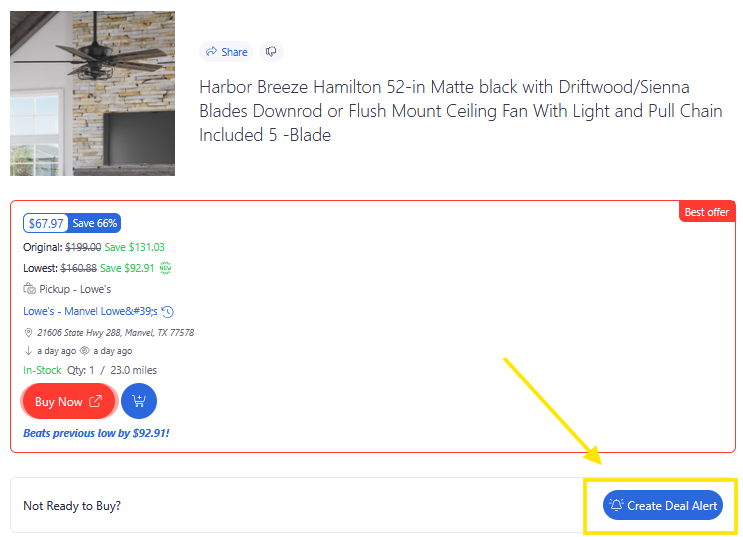
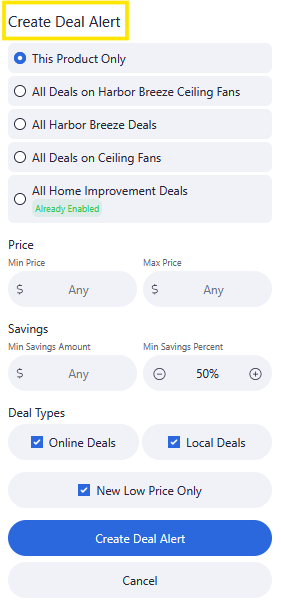
For one exact product, create your alert from its Product Page or an Inventory Checker and choose This Product Only.
A Simple Workflow
- Create a Deal Alert for what you're shopping for.
- Wait for a notification.
- Review the Product Page and Pricing Insights to confirm it's a good deal.
- For local deals, check inventory at your store before you go.
- Make your purchase.
- Select Mark as Bought so it's saved to your Savings Tracker.
Pro Tips
- Create alerts for things you're ready to buy at the right price, not everything you browse.
- Set a max price for big purchases. It's often more useful than a discount percentage.
- Remove alerts once you've made your purchase.
Frequently Asked Questions
Should I create a Deal Alert for everything?
Probably not. Alerts work best for things you plan to buy but are willing to wait on.
Do I need to add something to my Shopping List first?
No. Shopping Lists and Deal Alerts are separate, and you can use either one on its own.
Should I choose a brand or a category?
Start with a category if you're flexible. Choose a brand, or a brand within a category, if you only want one.
Related Lessons