Deals by Store
Browse every deal at one of your My Stores, so you can plan a trip around a single store.
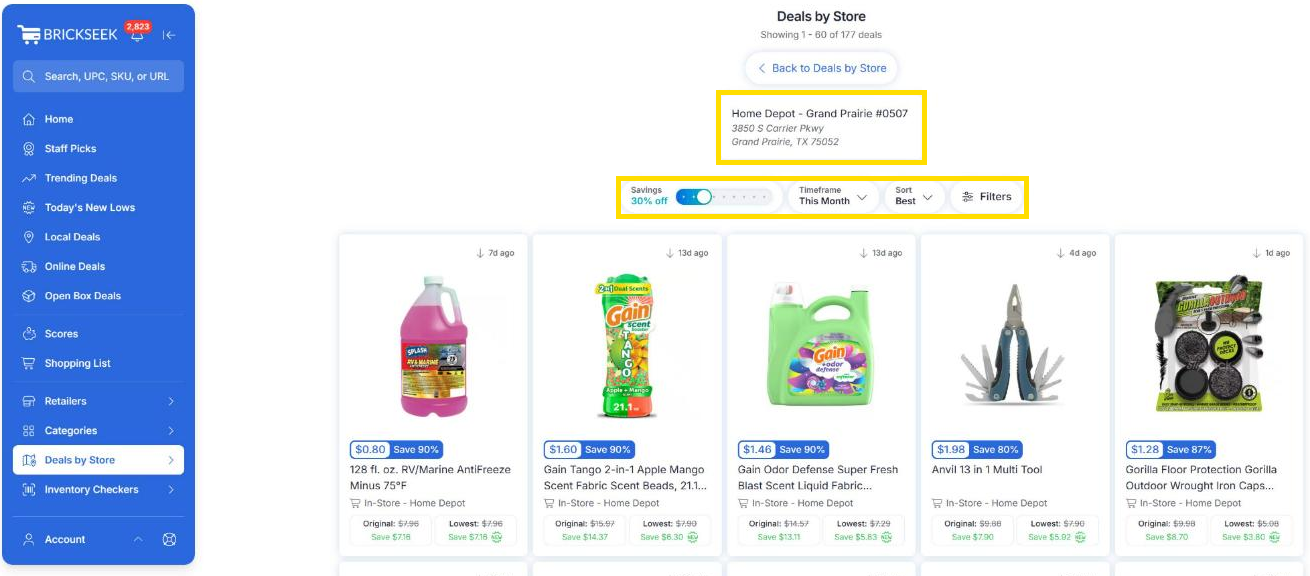
Deals by Store
Sometimes you’re not hunting for one product. You’re heading to a specific store and want to know what’s worth grabbing while you’re there.
Deals by Store shows the current deals at one of your My Stores, all in one place.
Finding Deals by Store
- Select Deals by Store in the sidebar.
- Choose a retailer: Dollar General, Home Depot, Kroger, Lowe’s, Target, or Walmart.
- Pick one of your My Stores. Each store shows how many deals it has right now.
- Browse that store’s deals.

Narrowing Down a Store’s Deals
Each store page shows 60 deals at a time. Use these tools to focus on what matters to you:
- Savings slider: Only show deals at or above a minimum discount.
- Timeframe: Only show deals found within a certain period.
- Sort: Change the order deals appear in.
- Filters panel: Narrow by Category, Price, Brand, or a minimum Savings Amount.
Works With Your My Stores
On Premium, Deals by Store shows the stores saved in your My Stores. To browse a different location, add it to My Stores first.
Premium members can save up to 12 stores per retailer. Extreme members can browse store markdowns at any store in the country, not just their My Stores. It’s perfect for checking deals while you’re traveling.
Planning a Store Trip
- Open Deals by Store for the store you’re visiting.
- Raise the Savings slider to focus on the biggest markdowns.
- Open a deal to review its Product Page and Local Offers.
- Add the items you want to your Shopping List.
- After your trip, select Mark as Bought so your savings are saved to your Savings Tracker.
Pro Tips
💡 Compare deal counts before you pick a store. Two nearby stores from the same retailer can have very different clearance.
💡 Use Timeframe to focus on recent deals, which are more likely to still be on the shelf.
💡 Add stores near work, school, or family to My Stores so you can check them before you stop by.
💡 Check Local Offers on the Product Page before heading out.
Frequently Asked Questions
Why can’t I open a store?
On Premium, Deals by Store only works with stores saved in your My Stores. Add the store first, then try again. Extreme members can open any store in the country.
Which retailers are included?
Dollar General, Home Depot, Kroger, Lowe’s, Target, and Walmart.
How many stores can I browse?
Premium includes up to 12 stores per retailer from your My Stores. Extreme members can browse any store nationwide.
Related Lessons